


Dr. Driving 2
4.34.03K Reviews
App Specs
- Version
- 1.66
- Updated On
- License
- Free
- Downloads
- 100,000,000+
- Developer
- SUD Inc.
- Categories
- Racing
- Platform
- Android, iOS
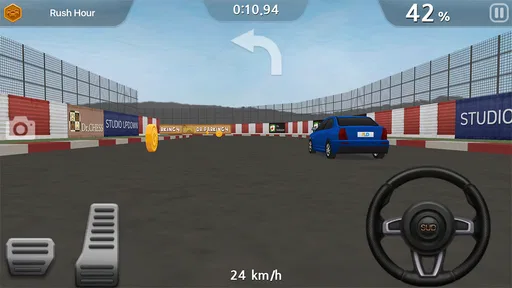
Screenshots
 Analysis by AppCompare
When a driving game feels difficult, it is not always clear whether the problem is the controls, the task, or simply a rushed approach. I find Dr. Driving 2 works best when I treat each trip as a small driving challenge rather than a race to finish at top speed. That shift in expectations makes its tight turns, parking tasks, and traffic easier to read—and helps explain why a mistake can matter more here than in a typical arcade racer.
Where a run can go wrong
The main adjustment is learning to slow down before a turn or parking maneuver. In a speed-focused racer, keeping the accelerator down is often part of the fun; here, it can leave too little room to correct a line or react to nearby traffic. If a run goes badly, I first look at whether I approached the difficult section too quickly instead of assuming the game’s steering has stopped responding.
It also helps to separate the goal of a mission from the habit of driving fast. A trip that asks for careful movement rewards a different rhythm from one where reaching the destination is the main concern. I try to identify the task’s priority before setting off, then make smoother adjustments rather than swerving at the last moment. That is a practical way to reduce avoidable bumps without needing a complicated strategy.
Simple checks before changing your approach
The game offers tilt and touch controls, so it is worth trying each style for a few minutes in a low-pressure situation. Tilt can feel natural if you prefer steering by moving the device, while touch gives you a more direct input. Neither is automatically better for every player: a control style that feels comfortable during a straight drive may feel less precise when parking. I would choose based on the task that causes trouble, not just the first impression.
If steering feels inconsistent, I make one change at a time. I check that I am holding the device in a steady position when using tilt, or that my taps are deliberate when using touch, then try the same kind of maneuver again. Switching controls, accelerating harder, and changing how I turn all at once makes it harder to tell what helped. Short, repeatable attempts are a better test than pushing through a whole session while annoyed.
It is also sensible to check that the phone is running a supported version of the operating system before installing. The game is free to download, but it includes optional in-app purchases, so I would review purchase settings before handing the phone to a child or letting someone else play on the device. Its Teen age rating is another useful point for families to consider when deciding whether it is suitable.
Recovering after a frustrating attempt
When a mission goes wrong, I prefer to restart with one specific correction in mind: brake earlier, make a wider turn, or leave more room around traffic. That turns a failed attempt into useful feedback. The parking challenges are especially good for this approach, because repeating the same maneuver makes it easier to notice whether I am entering at the wrong angle or correcting too sharply.
Worth Reading Before You Choose

Flipboard Shows What News Apps Must Do Beyond the Feed

Switching to Android Auto Means Rethinking Your Driving Routine

Google Calendar Makes a Crowded Week Easier to Manage

Ludo King Makes the Most of the Minutes Between Plans

Baby Panda World Brings Quick Play to Modern Phones, but Its Game Library Feels Busy

ESPN’s Live Game View Makes Following Close Games Easier
Upgrades can help as you progress, but I would not spend coins just because a mission felt difficult once. First, work out whether the problem was a rushed line or a control habit; an upgrade cannot fix every mistake in judgment. If a particular vehicle feels awkward, trying another available option may be more useful than immediately investing in changes. That small bit of patience can save resources for a genuine obstacle later.
When the phone, connection, or expectations matter
Some frustrations are not solved by changing how you drive. If the game behaves strangely, closing and reopening it and checking for a stable connection are reasonable basic steps, especially before assuming a mission or control is broken. If the issue continues, restarting the device and confirming the game is up to date are sensible checks. I would avoid repeatedly changing several settings at once, since that makes it difficult to identify the cause.
Expectations matter too. This is a driving game with racing elements, not a substitute for a full-scale simulator or a high-speed competition built around laps and overtaking. Someone who wants realistic road instruction may also find that a mobile game is the wrong tool. I see its best use as a compact, forgiving way to practice virtual steering, judge space, and enjoy short mission-based drives—not as a lesson for real roads.
First Impressions
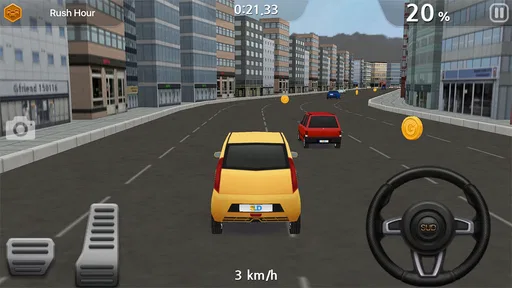
Let’s dive into the world of Dr. Driving 2. Right off the bat, the game gives off a vibe that’s both casual and challenging. The graphics are crisp and colorful, making the cityscapes look inviting yet demanding. I was immediately hooked by its simplicity. No unnecessary frills, just pure driving fun.
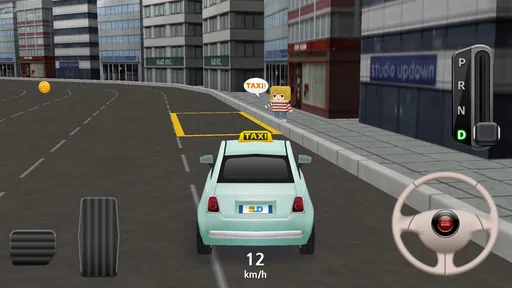
Upon launching the game, you’re greeted with a straightforward interface. It’s easy to navigate, meaning you won’t spend ages trying to figure out where to start. The game offers various modes, each with its unique challenges. From driving through bustling city streets to mastering tight parking spaces, there’s a little something for every driving enthusiast.
Gameplay and Features
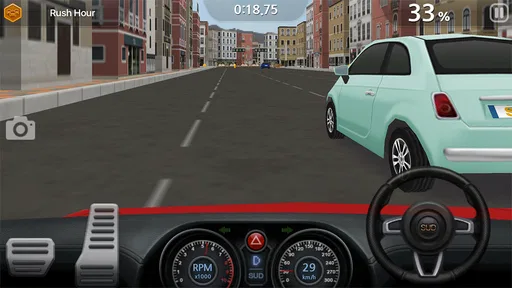
The gameplay is where Dr. Driving 2 truly shines. You’re not just racing against the clock; you’re also tasked with parking, fuel management, and avoiding collisions. This adds a layer of realism that many other driving games tend to overlook. The controls are responsive, making it easy to steer your way through the urban jungle. The tilt and touch controls both work smoothly, giving you the flexibility to choose your preferred driving style.
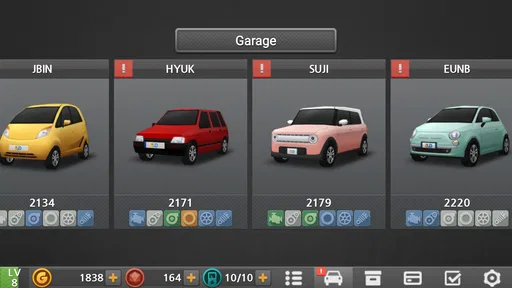
The game also offers a diverse range of vehicles. Whether you’re into sleek sports cars or robust trucks, there’s a ride for everyone. Each vehicle behaves differently, which adds to the challenge and replayability. And let’s not forget the upgrades! Tweaking your car’s performance to suit your driving style is both rewarding and essential as you progress through tougher levels.
Challenges and Rewards
Dr. Driving 2 isn’t just about driving aimlessly. The game introduces various missions that test your skills in different scenarios. Completing these missions earns you coins which can be used for upgrades. The missions range from simple point A to point B drives to more complex tasks like navigating through heavy traffic without a scratch.
The reward system is satisfying. The game doesn’t overwhelm you with ads or force you to pay for progress. It’s a balanced system that encourages skill development and strategic upgrades. You can enjoy the game at your own pace, which is a breath of fresh air in today’s app market.
Graphics and Sound
Visually, the game does a fantastic job with its detailed environments and car models. The graphics aren’t hyper-realistic, but they’re charming and fit the game’s overall aesthetic perfectly. The sound effects are also spot on, adding to the immersion. From the revving of engines to the honking of horns, the audio complements the driving experience without being overbearing.
For an everyday session, I like the idea of using a spare few minutes for one focused mission rather than opening the game expecting a long racing event. A commute break or a quiet wait is a good fit for that kind of play: pick a task, concentrate on its specific demand, and stop when you are ready. The missions give these short visits a purpose, while the different driving situations keep the experience from feeling like nothing but repeated laps.
One useful trade-off is that the same precision focus that makes parking satisfying can make the game feel fussy if you want instant, effortless action. I would recommend it to players who enjoy improving through small corrections and comparing how different vehicles handle. If you mainly want dramatic speed, long tracks, or a large competitive racing scene, a conventional arcade racer is likely a better match. The distinction is not a flaw so much as a matter of what kind of driving mood you are after.
Dr. Driving 2 is made by SUD Inc. and sits in the racing category, though its appeal is more about handling everyday driving challenges than winning a conventional race. It has a 4.3 average from around 801,000 ratings and has passed 100 million installs, which points to a broad audience for this compact style of play. The game is free, with optional purchases ranging from $1.99 to $99.99 per item, so I would treat spending as a personal choice rather than a requirement for trying it.
Choosing it for the right player
I think it suits someone who likes steering challenges, careful parking, and bite-sized missions more than someone who wants a pure speed rush. It can also be a nice fit for a player who finds long races hard to fit into a day: a single task gives a clear beginning and end. On the other hand, players looking for a deep simulation of real vehicle behavior should keep their expectations modest. Its appeal is accessible mobile driving, not professional training or a substitute for a dedicated simulator.
If a child will be playing, the Teen rating deserves attention alongside the purchase options. I would check the device’s purchase controls before letting someone play unsupervised, particularly if a payment method is already associated with the account. That is a sensible precaution for any game with in-app purchases, and it lets families make a decision based on their own rules rather than discovering an unintended charge later.
What to expect from installation and play
The current version is 1.66, and the minimum supported operating system is Android 6.0. Before installing, I would check the device’s available storage and system version, then use the official app catalog for the relevant platform. If installation or loading stalls, a stable connection, a little free space, and a fresh launch are reasonable first checks. Those steps are more useful than repeatedly reinstalling without first identifying whether the issue is the device or its connection.
Because the game mixes quick drives with progression and upgrades, I would also avoid treating every unsuccessful mission as a reason to spend. Try a more measured approach first, and use coins on changes that address a consistent difficulty rather than a single bad run. The payoff is not only conserving resources; it helps you learn which parts of your driving are improving and which vehicle choices genuinely suit your style.
Final Thoughts
All in all, Dr. Driving 2 is a delightful blend of fun and challenge. It’s a game that doesn’t take itself too seriously, yet offers enough depth to keep you engaged for hours. Whether you’re a casual gamer or a driving enthusiast, there’s something here for you.
The game’s emphasis on precision driving rather than just speed sets it apart from other racing games. It’s about mastering the art of driving, and it does so with style and substance. So, if you’re ready to test your driving skills in a virtual cityscape, give Dr. Driving 2 a spin. It might just become your go-to game for on-the-go fun.
Ready to hit the virtual streets? Download it today and see if you can handle the drive!
Pros
- Realistic driving physics enhance gameplay.
- Variety of missions keeps it engaging.
- Smooth graphics for an immersive experience.
- Easy controls suitable for all ages.
- Multiplayer mode adds competitive fun.
Cons
- In-app purchases can be pricey.
- Limited customization options for cars.
- Ads can be intrusive between levels.
- Requires internet for certain features.
- Progression can feel slow without purchases.
FAQs for Dr. Driving 2
What is Dr. Driving 2 and how is it different from the first version?
Dr. Driving 2 is a driving simulation game that builds on the original Dr. Driving by offering enhanced graphics, more challenging levels, and a variety of new cars. The game focuses on realistic driving experiences with improved physics, making it more engaging and fun than its predecessor.
Is Dr. Driving 2 free to play, and are there in-app purchases?
Yes, Dr. Driving 2 is free to download and play on both Android and iOS platforms. However, it offers in-app purchases that allow players to buy virtual currency or unlock additional features and vehicles, providing a more customized gaming experience.
What are the minimum device requirements to run Dr. Driving 2 smoothly?
To run Dr. Driving 2 smoothly, Android devices should have at least Android 4.1 (Jelly Bean) or higher, while iOS devices should be running iOS 9.0 or later. A device with at least 1GB of RAM is recommended for an optimal gaming experience, ensuring smooth graphics and gameplay.
Does Dr. Driving 2 require an internet connection to play?
Dr. Driving 2 can be played offline without an internet connection. However, certain features like multiplayer mode and daily rewards require an internet connection to access, allowing players to compete with friends or other players globally.
What kind of support is available if I encounter issues with Dr. Driving 2?
If you encounter any issues while playing Dr. Driving 2, you can access support through the app’s settings or the developer’s website. The support team is responsive and can assist with technical problems, gameplay issues, or questions about in-app purchases.


